sales06@switek.biz

+86 186 5927 5869

Shopping

Subscrib to Us
sales06@switek.biz
+86 186 5927 5869
Shopping
Subscrib to Us

Keywords:IML Robot; IML Robot Operating; In Mold Labeling Robotics
After clicking the Zone button we're entering the axis setting page where the operator will set the working zone of the IML robot axis. Here you can find two pages, in page area setting you can set the parameters of the working zone of the IML robot axis and the area correction page for the operator to modify the parameters of the IML robot axis.
Area Setting
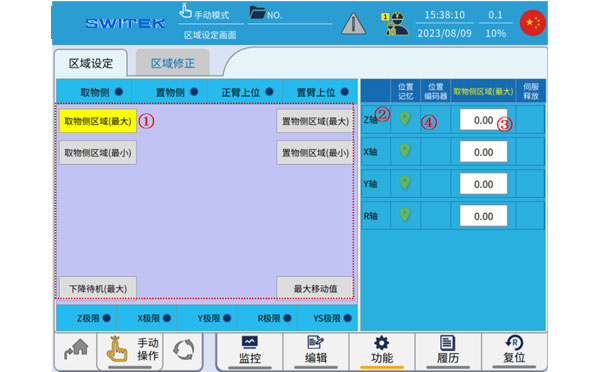
| No. | Name | Function |
|---|---|---|
| (1) | Point selection | Select the area extremum you want to set. |
| (2) | Current position memory | Click to memorize the current position of the axis to the (3) setting value. |
| (3) | Set value | Click to modify the setting. |
| (4) | Position | The current position of the axis is displayed. |
Aera Correction
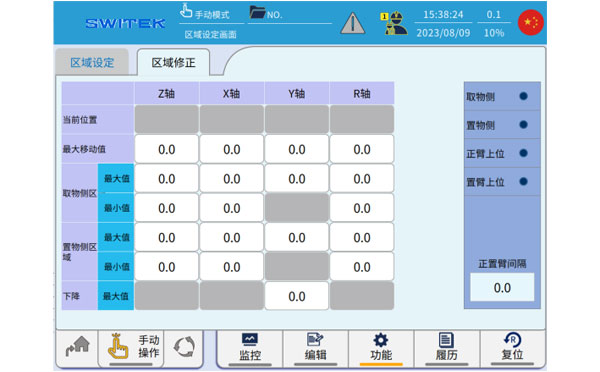
The parameters set in "Area Settings" can be viewed and modified in "Area Correction".
The set area parameters should be consistent with the sensor signal, etc.,, and the manipulator will be alarmed if it descends outside the set area, or if there is a tendency to move out of the set area in the downward state of the arm.


Contact SWITEK IML
sales06@switek.biz
+86 186 5927 5869

DongGuan, GuangDong, China
HuangYanZheng©Copy Right