switek email

sales06@switek.biz

switek whatsapp

+86 186 5927 5869

Subscribe to Us

.

High Performance Side Entry IML Robot

Keywords:IML Robot; IML Robot Operating; In Mold Labeling Robotics

SWITEK IML Robot Operating Instruction -- 3.3 Runs Automatically

Abstract

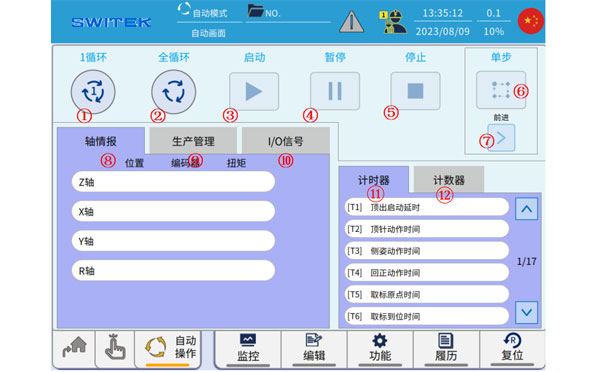
The IML robot will working automatically in IML production of the containers after programming and parameter setting. Toggle the knob in the upper left corner of the teach pendant to AUTO, and the interface of the IML robot will jumps to the following automatic screen. In this chapter we're introducing the functions of each buttom you can see in the Auto mold of the IML robot.
iml robot controller
No Name Function
(1) 1 Cycle
  • Select the number of run cycles to start automatic or single-step.
  • Select 1 cycle, and after the program has been running for 1 cycle, it will stop.
(2) Full cycle
  • Select the number of run cycles to start automatic or single-step.
  • Select Full Loop and the program will run continuously.
(3) Start
  • After selecting 1 cycle/full cycle, click this button to start the automatic operation.
(4) Pause
  • When running automatically, click this button and the operation will be paused.
  • After pausing, click "start" again to resume the operation.
(5) Stop
  • When running automatically, click this button, and the program will stop in the standby position and end the auto after the current cycle has been running.
(6) Single step
  • Select 1 cycle/full cycle, and click Single Step to enter the single step state.
  • Click Step again to exit Step Run.
(7) Forward/Backward
  • Enter the single-step state, click "Forward" once, and the program will run the one-step command.
(8) Axis intelligence
  • Position: The current position of the axis is displayed.
  • Encoder: The current position of the encoder (0-one revolution pulse value).
  • Torque: The value of the torque output in real time while the current shaft is running.
(9) Production management
  • Display of various production data generated during automatic operation
  • Take-out time, cycle time, molding time, number of one-time take-outs/number of take-outs, number of current production/scheduled number, defective rate/achievement rate, estimated completion time, number of defective products, and advance notification time time setting.
(10) I/O signals
  • Click to view the real-time changes of each I/O in automatic operation.
(11) Timer
  • Each timer setting is displayed, and you can turn up and down to view it.
(12) Counter
  • The settings of each counter and the current count are displayed, which can be viewed by turning the page up and down.

IMLRobot Operating Instruction

E-mail:sales06@switek.biz

WhatsApp

WeChat


You May Also Be Interested
Send Us An Inquiry Now
Submit