sales06@switek.biz

+86 186 5927 5869

Shopping

Subscrib to Us
sales06@switek.biz
+86 186 5927 5869
Shopping
Subscrib to Us

Keywords:IML Robot; IML Robot Operating; In Mold Labeling Robotics
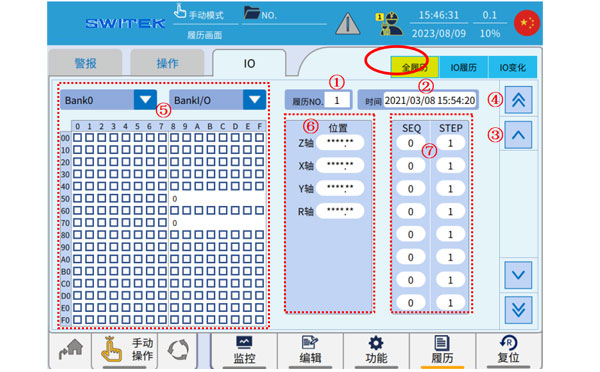
The "IO" is the input/output signal of which the IML robot communicating with the injection molding machine and other auxilary machinery. The "IO History" page will show the working status and any change of the IO for a fast trouble shooting of the IML robot.
All History
| No. | Name | Function |
|---|---|---|
| (1) | Currentresum number | The resume number is displayed. When an alarm occurs, the I/O change in the period before the alarm is recorded, each change is one resume. |
| (2) | History record moments | The point in time of the current resume. |
| (3) | Single switching history | Click to scroll up and down to switch resumes individually. |
| (4) | Multiple switching histries | Click up and down to switch multiple resumes. |
| (5) | Instantaneous internal flag bit recording | IO BANK resume, which records all the changes in internal markers at this time. |
| (6) | Instantaneous axis position recording | At this time of history, each axis position is recorded. (SEQ is the program number, and STEP represents the first steps in the previous program) |
| (7) | Instantaneous program monitoring | At this time of history, the procedures being performed and the number of steps recorded. |
When an alarm occurs, the system will automatically record the IO switching situation in a period of time before the alarm, and each IO change will generate a resume, which contains the IO status of the IO transformation at the time point, the axis position, the program number and the number of steps executed, and the status of all internal flags, and the user can find the cause of the alarm by flipping through these resumes. (The system can record a limited number of resumes, after the alarm, if you want to keep the resume, please export the resume in time, or prevent a new alarm from occurring, and the new resume will cover the old resume).
IO Resume

| No. | Name | Function |
|---|---|---|
| (1) | Resume1 | The left and right are the IO display of adjacent resumes, and the changes in IO can be visually compared and observed. |
| (2) | Resume2 | |
| (3) | Single switching resume | Click up and down to switch IO resumes individually. |
| (4) | Multiple switching resumes | Click to scroll up and down multiple toggle IO resumes. |
| (5) | Page | Click here to view all the IOs in your resume. |
IO Changes
| No. | Name | Function |
|---|---|---|
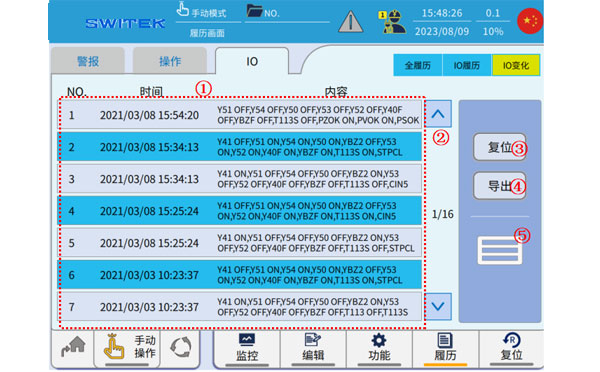
| (1) | IO change record | At a specific time, the change of IO is recorded. |
| (2) | Page | Click to scroll up and down to view the I/O changes |
| (3) | Reset | Click to reset the data. |
| (4) | Export | Click Export Resume Data |
| (5) | Presentation mode switching | Click to switch presentation methods. |


Contact SWITEK IML
sales06@switek.biz
+86 186 5927 5869

DongGuan, GuangDong, China
HuangYanZheng©Copy Right