sales06@switek.biz

+86 186 5927 5869

Shopping

Subscrib to Us
sales06@switek.biz
+86 186 5927 5869
Shopping
Subscrib to Us

Keywords:IML Robot; IML Robot Operating; In Mold Labeling Robotics
While an IML robot is in production of the IML containers, the robotic arm will pick the parts out and have them placed on the conveyor. In this chapter we'll introduce how to design the stacking and layout format of the parts on the conveyor in your program.
Standard stacking
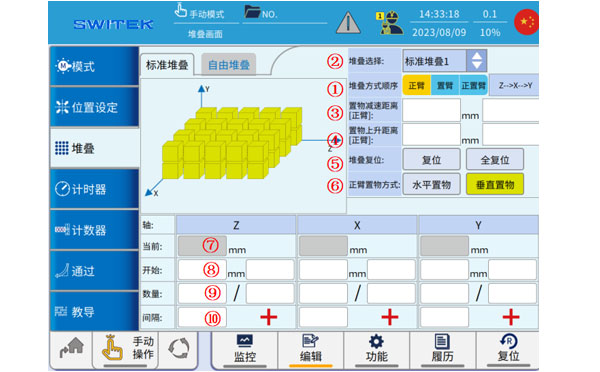
| No. | Name | Function |
|---|---|---|
| (1) | Stacking mode | Select the axis order setting that will be prioritized when the stack runs. |
| (2) | Select | 8 Stacks, click to select the stack number that is currently set. |
| (3) | Decline deceleration | Click to set the distance and speed of the stack run before decelerating into place. |
| (4) | Ascending deceleration | Click to set the stack to run and decelerate after the start of the ascent and the speed. |
| (5) | Stack reset | Reset: The current stack-related data is reset. Full Reset: All stack-related data is reset. |
| (6) | Placement mode | Horizontal placement: that is, the product is placed in the side posture of the fixture; Vertical storage: that is, the fixture is back to the normal state to put the product. |
| (7) | The current value of the axis | The current position of each axis is displayed. |
| (8) | Start position | The start point/speed at which each axis is stacked. |
| (9) | Interval number | Sets the current number of stacks or the total number of stacks in each axis. |
| (10) | Interval value | Set the interval value for each axis. |
Standard stacking is generally used for placing products at equal spacing, and by setting up stacking groups on this page, when placing products, they will be placed according to the setting. If you take out multiple products at a time (using multiple sets of suction holders), you can select "products are packed separately" in the mode, and then set up multiple stacks, and the products on each suction jig will be placed in the corresponding stacking matrix during operation.
Free Stack
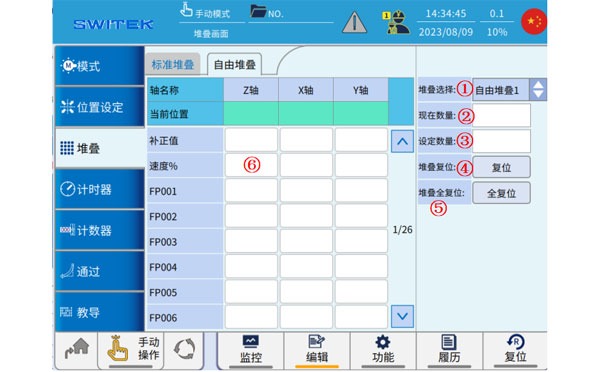
| No. | Name | Function |
|---|---|---|
| (1) | Stacking selection | 8 Free stacks, click to select the current set free stack number. |
| (2) | Current quantity | The number of stack points that are currently running. |
| (3) | Setting number | The total number of points that are freely stacked. |
| (4) | Stack reset | Click to reset the current free stack. |
| (5) | Stack full reset | Click to reset all free stacks. |
| (6) | Speed % | Set the running speed of each axis. |
Free stacking is generally used for understand and irregular point product placement, first select (1) free stacking number, then set (3) stacking point number, and then set the position of each point in turn. Free stacking is generally used when using the teaching program, and after setting it up, you need to edit the relevant call logic in the teaching.


Contact SWITEK IML
sales06@switek.biz
+86 186 5927 5869

DongGuan, GuangDong, China
HuangYanZheng©Copy Right