switek email

sales06@switek.biz

switek whatsapp

+86 186 5927 5869

Subscribe to Us

.

High Performance Side Entry IML Robot

Keywords:IML Robot; IML Robot Operating; In Mold Labeling Robotics

SWITEK IML Robot Operating Instruction -- 3.2 Origin Reversion

Abstract

Every time when you re-start the IML robot, it's very important to have the axis of the robotic arm back to the origin position. Here in this chapter you'll lean how to do the "ORG" of the IML robot before automatic running.

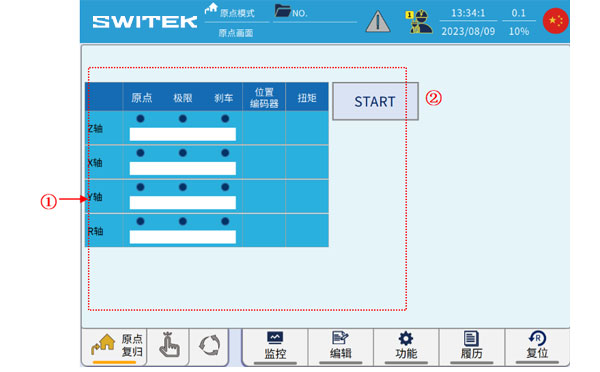
Toggle the knob in the upper left corner of the teach pendant to ORI, and the interface jumps to the origin screen:
iml robot controller
No Name Function
(1) Axis data
  • Origin: The upper light is on to indicate that the origin signal is triggered;
    The lower value represents the amount of origin raster, that is, the ratio of the distance traveled to the next Z signal (zero point) after the origin is triggered, and the distance travelled to the 1 lap pitch value.
  • Limit: The light is on to indicate that the positive limit signal is triggered;
  • Brake: The light is on to indicate that the brake has been released and the shaft can be operated;
  • Position: The upper 0.00 value indicates the current position of the axis (after returning to the origin).
    The lower value of 0.0 indicates the current position of the encoder (0-one revolution pulse value).
  • Torque: The value of the torque output in real time while the current shaft is running.
(2) START key Click to start the automatic return to origin action.

In origin ORG mode, press the START button to start origin reset.


IMLRobot Operating Instruction

E-mail:sales06@switek.biz

WhatsApp

WeChat


You May Also Be Interested
Send Us An Inquiry Now
Submit