sales06@switek.biz

+86 186 5927 5869

Shopping

Subscrib to Us
sales06@switek.biz
+86 186 5927 5869
Shopping
Subscrib to Us

Keywords:IML Robot; IML Robot Operating; In Mold Labeling Robotics
The "Production management" page is where for the factory owner to whatch up the production status of the IML system to optimize the production and improve the quality of the IML containers produced. Here in this chapter we'll introduce the setting of the "Production management" of the IML robot.
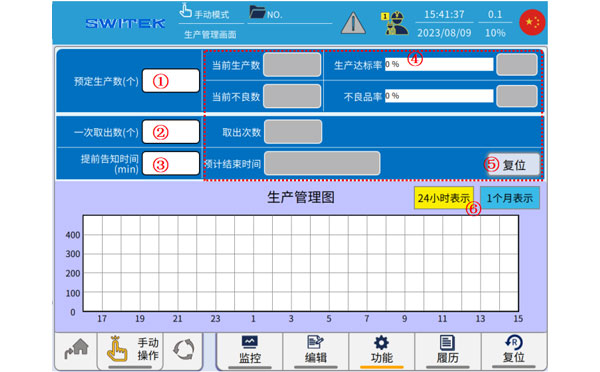
| No. | Name | Function |
|---|---|---|
| (1) | Scheduled production number | Click to set the total number of items to be produced. When this is achieved, it will automatically stop and prompt. |
| (2) | The number of take-outs at once | Click to set the number of products to be removed per cycle. |
| (3) | The moment of start of producdtion | Click the start time for production. |
| (4) | Current production numbers | The number of units currently produced is displayed. |
| Production achievement rate | The ratio of the number of completed production units to the nubmer of scheduled producdtions, that is, the production progress. | |
| The current number of defects | The number of defective products accumulated by the current production. | |
| Defective product rate | The ratio of the number of defective products to the total number of products produced. | |
| Number of take-outs | The number of times it was taken out cumulatively. | |
| Estimated end time | The expected time for the system to complete the scheduled number of productions. | |
| (5) | Reset | Click to reset the display number at (4) to zero |
| (6) | 24h/1 Month production curve | Click to switch the time field of the production management chart. |


Contact SWITEK IML
sales06@switek.biz
+86 186 5927 5869

DongGuan, GuangDong, China
HuangYanZheng©Copy Right