sales06@switek.biz

+86 186 5927 5869

Shopping

Subscrib to Us
sales06@switek.biz
+86 186 5927 5869
Shopping
Subscrib to Us

Keywords:Panasonic A6 Servo Motor, Panasonic A6 Servo Motor Driver, Panasonic A6 Servo Motor setting instruction
The timing chart shows the servo-on signal accept timing on power-up of a Panasonic A6 series AC servo motor from AC power-ON to command input.
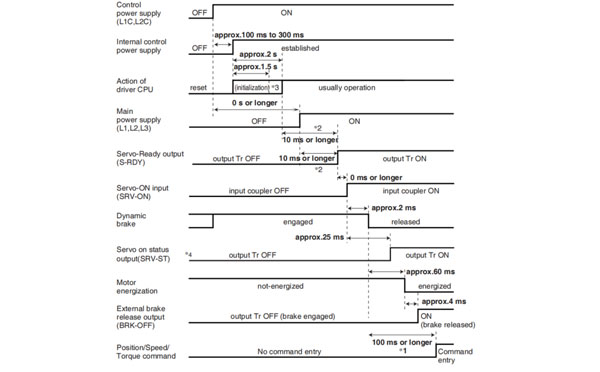
Caution → *1. In this term Servo-ON input (SRV-ON) turns ON as a hard ware, but operation command can not be received.
*2. S-RDY output will turn on when both conditionss are met, initialization of micro computer has been completed and the main power has been turned on.
*3. After internal control power supply, protective functions are active from approx. 1.5 sec after the start of initializing microcomputer. Please set the signals, especially for protective function, for example over-travel inhibit input (POT, NOT) or external scale input, so as to decide their logic unit this term.
The lapse time can be changed with Pr6.18 Wait time after power-up.
*4. Servo ON status output (SRV-ST) is a signal indicating that it has received the Servo-On input; please note that it is not an indication showing command input is possible.
Related page → •P.4-6 to P.4-85... "Details of parameter"
• DB/Free run deceleration operation
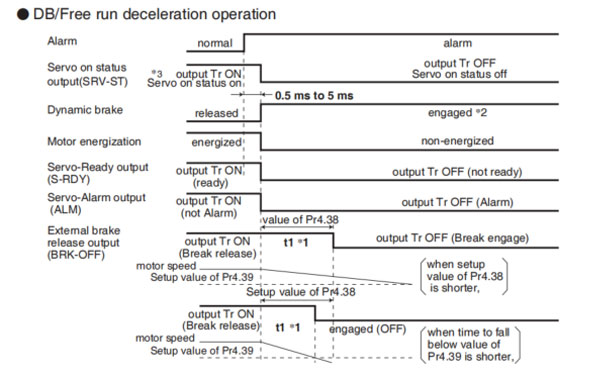
• Immediate stop operation
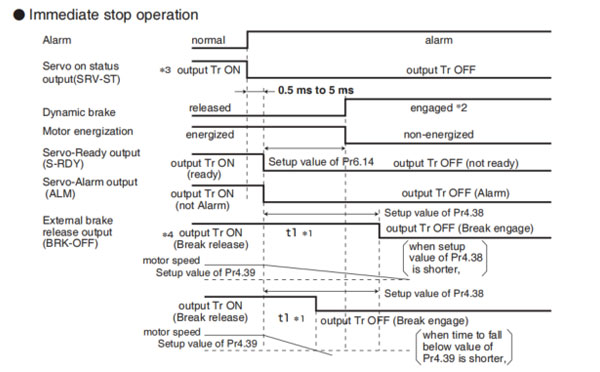
Caution → *1. t1 will be a shorter time of either the setup value of Pr4.38[Mechanical brake action at running setup] or elapsing time for the motor speed to fall below Pr4.39 [Brake release speed setup].
t1 will be 0 when the motor is in stall regardless of the setup pf Pr4.37.
*2. When an alarm is generated, the dynamic brake operates according to Pr5.10 Sequence at alarm.
*3. Servo ON status output (SRV-ST) is a signal indicating that it has received the Servo-On input; please note that it is not an indication showing command input is possible.
*4. The setting where Pr4.38 "Mechanical braking setting during operation" = Pr6.14 "Immediate stop time in case of alarm" is recommended.
When set to Pr4.38 ≤ Pr6.14, the brake will be operated after lapse of Pr4.38 time.
When set to Pr4.38 < Pr6.14, the brake will not operate even after lapse of Pr4.38 time, but will operate when transitioned to OFF state.
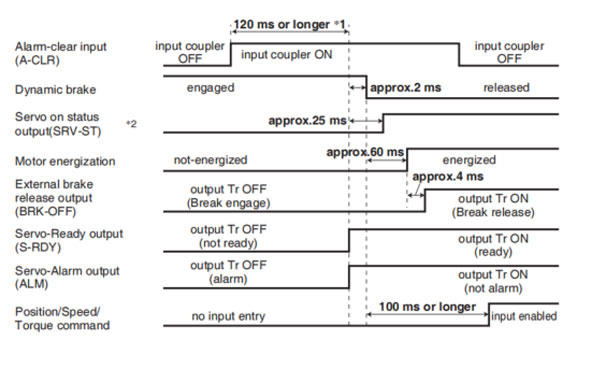
Caution → *1. The alarm clear input recognition time can be changed in Pr5.16 Alarm clear input setup.
*2. Servo ON status output (SRV-ST) is a signal indicating that it has received the Servo-On input; please note that it is not an indication showing command input is possible.
Remarks → To turn on/off the servo during normal operation, first stop the motor.
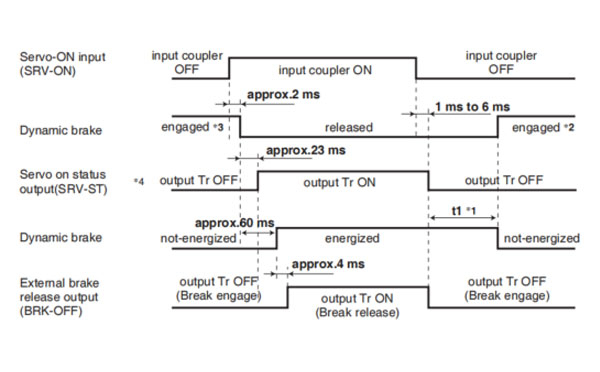
Caution → *1. t1 depends on the setup value of Pr4.37 Setup of mechanical brake action at stalling.
*2. The operation of dynamic brake during servo off depends on the setup value of Pr5.06 Sequence at servo off.
*3. Servo-ON will not be activated until the motor speed falls below approx.30 r/min.
*4. Servo ON status output (SRV-ST) is a signal indicating that it has received the Servo-On input; please note that it is not an indication showing command input is possible.
Related page → •P.4-47, 4-54 "Details of Parameter"
Remarks → Timing at emergency stop or trip. Do not repeat this sequence.
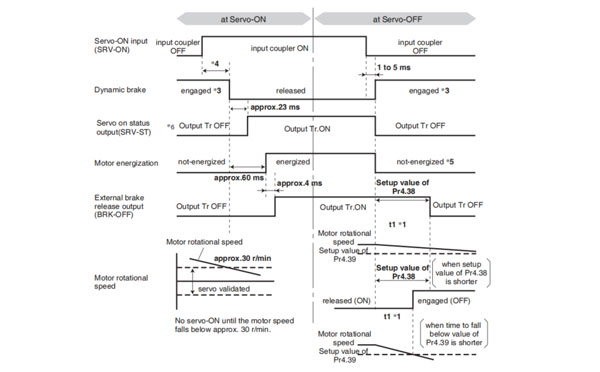
Caution → *1. t1 will be a shorter time of either the setup value of Pr4.38 "Mechanical brake action at running setup" or elapsing for the motor speed to fall below Pr4.39 "Brake release speed setup".
*2. Even though the SRV-ON signal is turned on again during the motor deceleration, Servo-ON will not be activated until the motor stops.
*3. For the action of dynamic brake at alarm occurrence, refer to an explanation of Pr5.06, "Sequence at Servo-OFF" as well.
*4. Servo-ON will not be activated until the motor speed falls below approx. 30r/min.
*5. For the motor energization during deceleration at Servo-OFF depends on the setup value of Pr.5.08, "Sequence at Servo-OFF".
*6. Servo ON status output (SRV-ST) is a signal indicating that it has received the Servo-On input; please not that it is not an indication showing command input is possible.
Related page → • P.2-47 "Dynamic brake"


Contact SWITEK IML
sales06@switek.biz
+86 186 5927 5869

DongGuan, GuangDong, China
HuangYanZheng©Copy Right