sales06@switek.biz

+86 186 5927 5869

Shopping

Subscrib to Us
sales06@switek.biz
+86 186 5927 5869
Shopping
Subscrib to Us

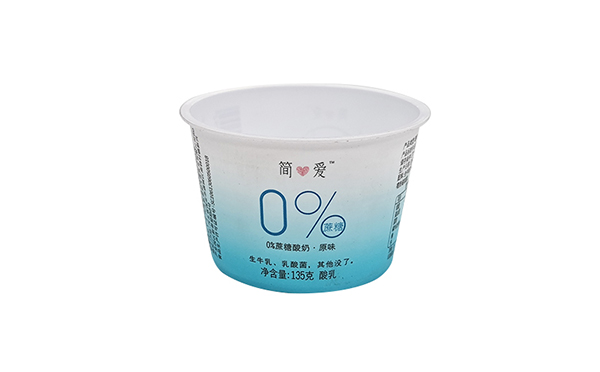
With the control system developed by the Austria automatic company SIGMATEK GmbH & Co KG, SWITEK high speed side entry IML robot is providing a more efficient and outstanding performance for your quality bulk production of the IML Yogurt Cups.
1.3.19 Servo Axis Running Parameters Settings (Axis)
Return to the Function page, Choose Servo axis running parameters Settings screen (This page needs level 10 of the administrator password), as the picture below 1.3.19:
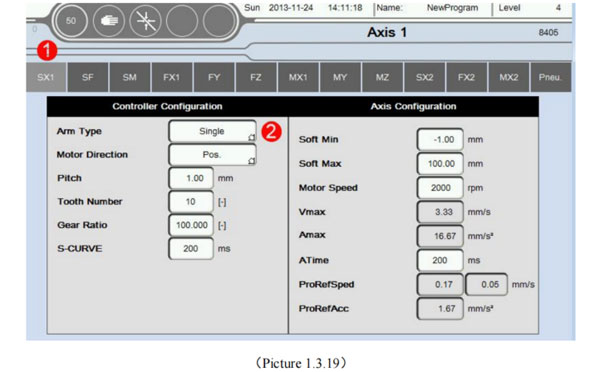
| Control parameter configuration | ||
|---|---|---|
| Arm Type | [-] | Can choose the arm is single or double, according to the actual situation |
| Motor Direction | [-] | Can choose Positive or Negative Only when useing SigmaTek drive. This setting effective; When Opposite the forward direction and the actual, can choose Positive/Negative correction; |
| Pitch | [-] | Distance between the two tooth dividing of the circles Synchronous round of reducer. |
| Tooth Number | [-] | The number of reducer of axis synchronous gear (Multiplied by the pitch is the circumference) |
| Gear Ratio | [-] | Connect the motor reducer reduction ration |
| S-CURVE | ms | Affecting the host sends pulse waveform curve. The greater the numerical, accelerate maximum speed longest, run smoother. |
| Servo parameters configuration | ||
| Soft Min | mm | Mechanical minimum position allowed, suggest to set 1.00. |
| Soft Min | mm | Mechanical maximum position allowed, according to the actual mechanical dimensions. |
| Motor Speed | RPM | Set motor rated speed, please refer to the motor nameplate rated speed setting. |
| Vmax | mm/s | Motor speed automatically calculates the maximum output value, users do not need to self-assess. |
| Amax | mm/s2 | Motor to accelerate from standstill to maximum speed, the maximum acceleration |
| ATime | ms | Motor accelerates from zero to maximum speed time required. |
| ProRefSped | mm/s | The speed of the motor back to zero |
| ProRefAcc | mm/s2 | The accelerated of the motor back to zero |
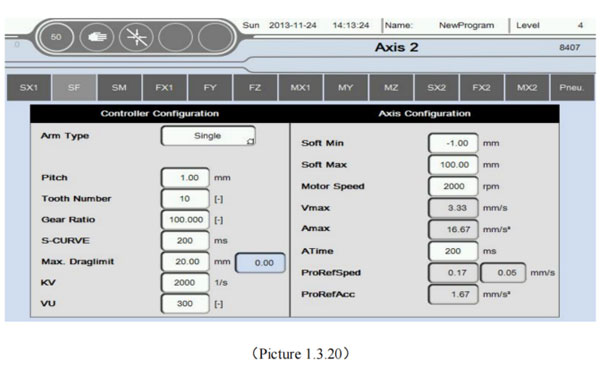
Click "SF", Show as the picture below 1.3.20 (Non Sigmatek drive setup):
| Control parameter configuration | ||
|---|---|---|
| Arm Type | [-] | Can choose the arm is single or double, according to the actual situation |
| Pitch | mm | Distance between teh two tooth dividing of the circles Synchronous round of reducer |
| Tooth Number | [-] | The number of reducer of axis synchronous gear (Multiplied by the pitch is the circumference) |
| Gear Ratio | [-] | Connect the motor reducer reduction ratio |
| S-CURVE | ms | Affecting the host sends pulse waveform curve. The greater the numerical, accelerate to maximum speed longest, run smoother. |
| Max Draglimit | mm | Deviation between instructions position and motor actual running position |
| KV | 1/s | Proportion factor |
| VU | [-] | Integrating factor |
| Servo parameters configuration | ||
| Soft Min | mm | Mechanical minimum position allowed, suggest to set-1.00. |
| Soft Min | mm | Mechanical maximum position allowed, according to the actual mechanical dimensions. |
| Motor Speed | RPM | Set motor rated speed, please refer to the motor nameplate rated speed setting. |
| Vmax | mm/s | Motor speed automatically calculates the maximum output value, Users do not need to self-accesses. |
| Amax | mm/s2 | Motor to accelerate from standstill to maximum speed, the maximum acceleration |
| ATime | ms | Motor accelerates from zero to maximum speed the time required |
| ProRefSped | mm/s | The speed of the motor back to zero |
| ProRefAcc | mm/s2 | The accelerated of the motor back to zero |
Specific set rules can be seen in the table below:
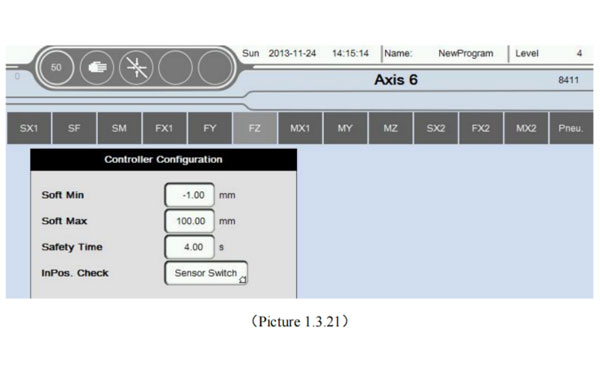
Click "FZ", Show as the picture below 1.3.21 (Pneumatic axis setting).
Specific set rules can be seen in the table below:
| Controller Parameter Configuration | ||
|---|---|---|
| Soft Min | mm | The minimum stroke with cylinder run (Can set indented state to the minimum position. Aso can set out of state to the minimum position). NoteⓈ |
| Soft Min | mm | The minimum stroke with cylinder run (Can set indented state to the maximum position. Also can set out of state to the maximum position). Note⑥ |
| Safety Time | s | Show as InPos. Check |
| InPos.Check | [-] | Which method you choose determines detection in place, Sensor Switch/Safety Time
|
Click "Pneu.axis", Show as the picture below 1.3.22
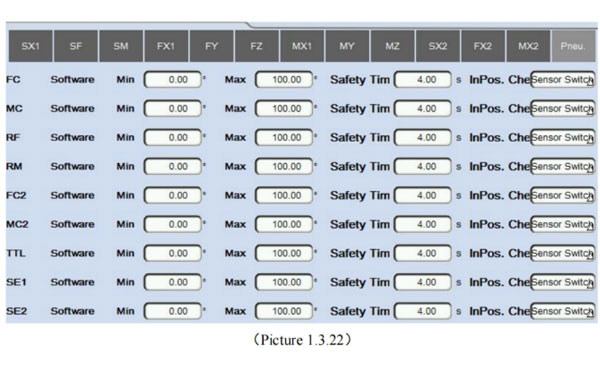
Specific set rules can be seen in the table below:
"FC" "MC" are Pneu, Axis. The specific set of rules, as list in the following table.
| Controller configuration | ||
|---|---|---|
| Soft Min | ° | As the above-mentioned Note Ⓢ |
| Soft Max | ° | As the above-mentioned Note ⑥ |
| Safety Time | s | As the below inPos.Check |
| inPos.Check | As the above-mentioned Note ⑦ | |


Contact SWITEK IML
sales06@switek.biz
+86 186 5927 5869

DongGuan, GuangDong, China
HuangYanZheng©Copy Right