SWITEK IML Robot Instruction -- SigmaTek -- Function Screen
Abstract
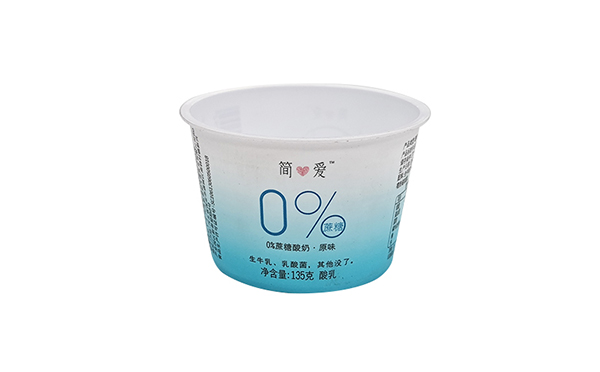
With the control system developed by the Austria automatic company SIGMATEK GmbH & Co KG, SWITEK high speed side entry IML robot is providing a more efficient and outstanding performance for your quality bulk production of the IML Yogurt Cups.
1.3 Function Screen
1.3.1 Function Screen
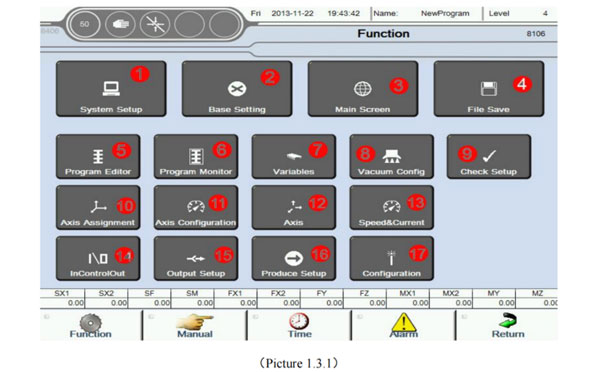
Click Function button into function screen, as the picture below 1.3.1;
Set some system function parameters;
Set language, unit, date, screen saver, change Password and parameter auto save period;
Main screen;
Use for Program/servo parameter/IO parameter/system parameter/system even save etc;
Program Editor;
Program Monitor;
Use for variables parameter settings, variable naming operations etc;
Vacuum config;
Check whether relevant feedback signals and other function signals use;
Used to set the usage of each axis, Including servo axis andd pneumatic axis And set reference sequence, reference point etc;
Used to set sevo running speed, each axis gain parameters and servo alarm message, clear servo alarm etc;
For each axis running parameters Settings;
Used to monitor the real-time speed, current value and torque of each axis;
Use the input signal to control the output signal;
At the automatic runtime out whether disconnect the corresponding output;
Set the parameters related to production;
Set including Select type of the machine, the status of Module configuration and Module check etc;
1.3.2 System Setup Screen
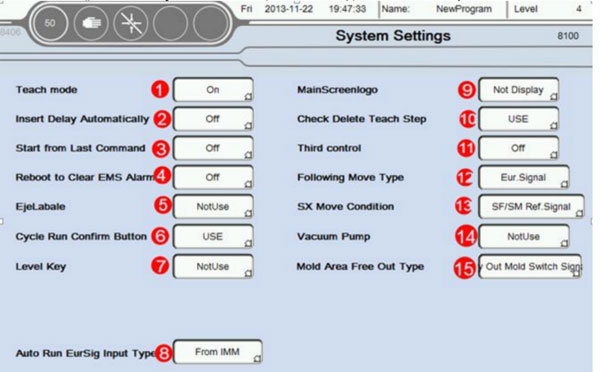
When Axis set position, direct input end position if the mode is Program Editor; When Axis set position, need to manually move the axis to be desired position if the mode is Program Editor;
Need to manually add the delay orders after insert action if the mode is Program Editor;
System will automatically add delay command after insert action if the mode is Program Editor;
Machine stop after occur error when automatic. When start automatically again, the machine continue to run follow the steps to stop before;
Machine stop after error when automatic. When start automatically again, the machine continue to run follow the first step form program;
After reboot emergency switch, need to restart clear the emergency alarm. After reboot emergency switch, emergency alarm clear;
Do not use EjeLabel; Use EjeLabel;
Cycle run confirm button, Click three buttons of the Controller on the left from top to bottom successively, beginning to run automatically; Cycle run use confirm button, needed peripheral switch signal to trigger the cycle run after click three buttons of the controller on the left from top to bottom successively. This function is applicable to the safety confirmation before cycle run;
Do not use level key (Need higher lever authority); Use level key (Need higher level authority);
Needs to access Open/Close mould, robot automatic etc When cycle run from injection moulding machine. Can be cycle run do not need to obtain relevant signals from the injection molding machine.
Display manufacture LOGO on main screen; Do not display manufacturer LOGO on main screen.
Confirm delete message appears when delete program step if the mode is program editor;
Direct delete program step and message do not appear when delete program step if the mode is program editor, In order to prevent the program steps accidentally deletedd, Suggest to open this function;
If click light upleft first button of controller when robot ar used, Output 24V to injection molding machine, else output 0V.
If click light upleft first button of controller when robot are used. Output 0V to injection molding machine, else output 24V.
The part of the operation can be controlled by the injection molding machine manipulator. Limited to (Enable, startup, stop, Passwrod level change, speed change etc. );
Robot can to enter after receives the mould complete; Robot can to enter afte corresponding grating signal was detected; Robot can to enter after open mold to set position (robot follow-up); Robot can to enter after open mold to set position and corresponding grating signal was detected; (robot follow-up);