HIGH SPEED IML ROBOT
Keywords:Panasonic A6 Servo Installation Instruction, Panasonic A6 Driver, Panasonic A6 Series Servo Motor Manual
14. How to Use the Front Panel — Structure of Each Mode
Abstract
The led front panel of the Panasonic A6 servo motor driver will display the running status of the motor and the alarm code if there's an alarm occurred during the running of the system. It's also the interface of Panasonic A6 servo motor to the operator in parameter setting. Here in this chapter you'll have an outlined guide of each mode of the Panasonic A6 series motor driver.
Use each button on the touch panel to select the structure and switch the mode.
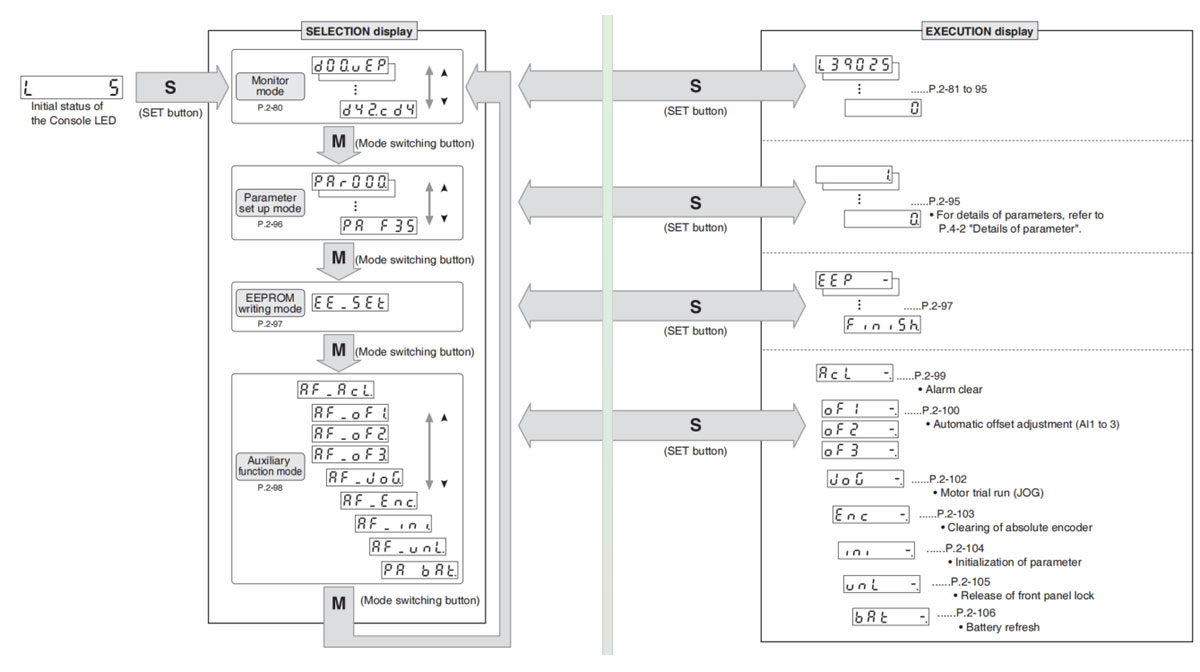
Note → You can change the flashing decimal point with <, then shift the digit for daga change "."
Caution → On power-up, the monitor mode executed is displayed according to the setup of Pr5.28 LED initial status.